Everything it does

This is the full list — every tool, feed and setting I've built into Best Homepage Ever. No ads on any of it, and most of it is free forever.

Your homepage

The core of the site. Every site you visit, in one place, arranged the way you want it.

Unlimited sites

Add as many website shortcuts as you like, grouped into categories you name yourself. There's no cap and no upsell.

Drag to rearrange

Move any shortcut, category or widget by dragging it. The layout saves to your account, so it follows you between computers.

Custom icons

Icons are pulled in automatically, and you can replace any of them with your own image if a site picks a bad one.

Themes

Light, dark and a set of color themes, plus your own saved appearance settings.

Search built in

Search the web from the homepage, with an AI answer option when you want more than a list of links.

Weather & places

A live weather widget for the places you save, right alongside your sites.
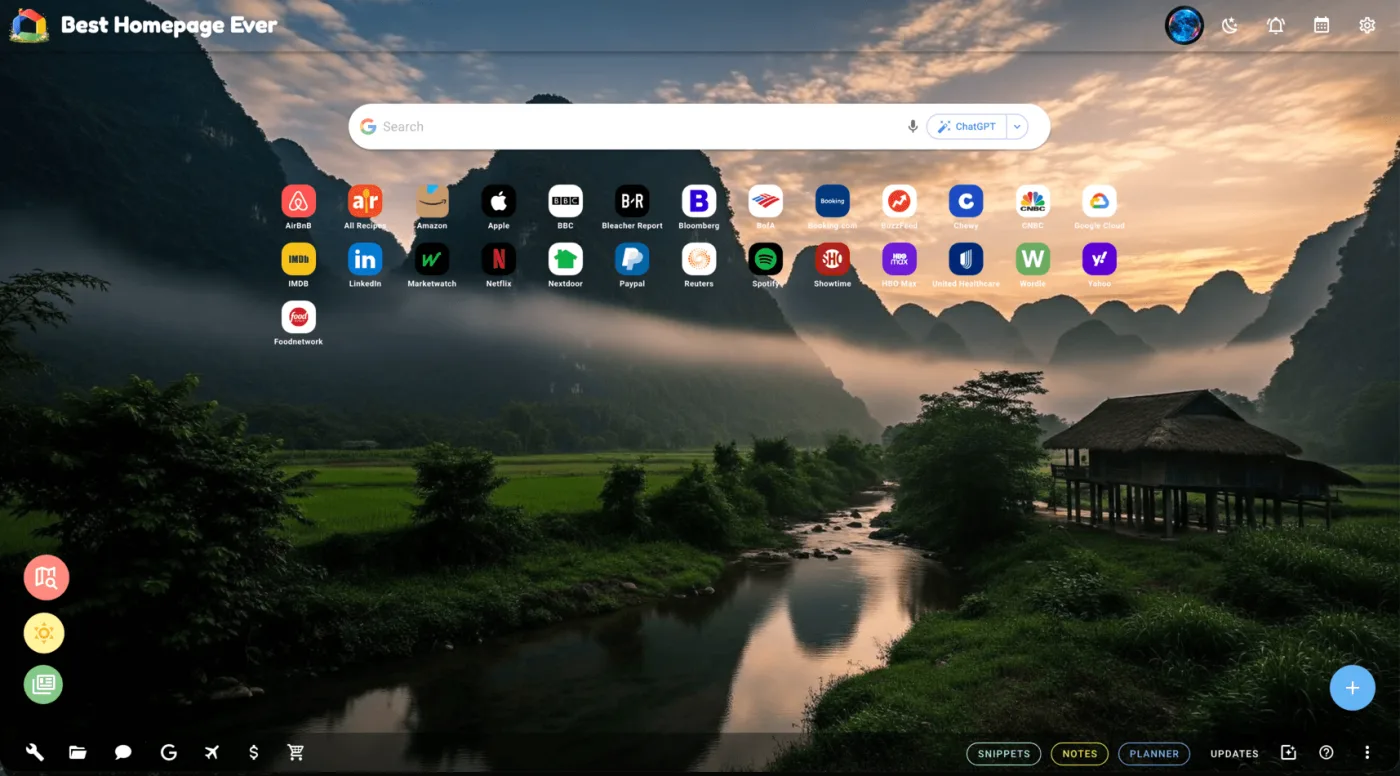
Best Homepage Ever with website shortcuts arranged into categories

Backgrounds

Over 1,200 ultra-high-definition backgrounds, plus the ability to make your own.

1,200+ UHD backgrounds

A curated 4K library covering landscapes, cities, space, abstract and seasonal sets. Free for everyone.

AI background generation

Describe the background you want and I'll generate it. Six free generations to start; Pro removes the limit.

Animated & living backgrounds

Motion backgrounds that render on the page itself, plus a set of looping video scenes. Both are opt-in, so nothing animates unless you ask for it.

Your own gallery

Save the backgrounds you like and switch between them. Free accounts keep six saved; Pro keeps as many as you want.

Daily Brief

A written summary of what happened, waiting for you each morning and evening. It's the newest thing I've built and the one I use most.

Twice a day

Generated fresh in the morning and again in the evening, so it's current when you open your homepage.

Nine free topics

Every free account gets a curated set of nine popular topics — no setup needed.

Or pick your own 15

Pro accounts choose any fifteen topics from the full catalogue and get a brief built around exactly those.

News

Headlines from the outlets you actually read, with none of the pop-ups, auto-playing video or tracking walls.

Pick your sources

Choose which outlets appear and hide the ones you don't want. Your selection is remembered.

Sections that matter

Top news, sports, finance, tech and a lighter section for when you've had enough of the other four.

Four countries

United States, United Kingdom, Australia and Canada, each with their own source list.

Open the news page — it works without an account.

Money

A full financial dashboard. Free, with no brokerage account or subscription required to use it.

Positions & watchlist

Track what you hold and what you're watching, with live quotes and day-to-day performance.

Market movers

The day's biggest gainers and losers, plus Bitcoin and gold prices at a glance.

Earnings calendar

See who reports and when, so nothing you hold surprises you on a Tuesday morning.

Earnings call transcripts

Read the full transcript of a company's earnings call, with an AI summary if you'd rather not read all of it. Five analyses a month free; unlimited on Pro.

Calculators

Compound interest and Black-Scholes options pricing, built in and free to use.

Financial notes

Keep your own notes against the dashboard — a thesis, a price you are waiting for, whatever you need.

Planner, Notes & Snippets

The parts people end up using every day. All free, all synced to your account.

Planner

Projects, tasks and subtasks with priorities and due dates. Drag to reorder, drag between projects, and sort however you think.

Notes

A proper notes editor with folders, so the note you wrote three months ago is still findable.

Snippets

Save an article or a recipe with my PinDrop extension and read it back later, cleaned up and without the ads.

Travel

Somewhere to put a trip that isn't a folder of screenshots in your phone.

Trips

Build a trip with its flights and places to stay, laid out in order so you can see the whole thing at once.

Paste a confirmation email

Paste an airline or hotel confirmation straight in and the details are read out of it and attached to the right trip.

Bucket list & notes

Keep a running list of places you want to go, with notes against each one.

Tools, games & extensions

The small things that save you a search. None of them need an account.

Extensions

  • PinDrop — save articles and recipes to your homepage
  • Portal — reach your sites from anywhere in the browser
  • New Tab — open your homepage in every new tab
  • See all extensions

No ads. Not on any of it.

I don't sell ad space and I don't sell your data. There's no tracking profile behind your homepage, and nothing on the page is trying to get you to click somewhere you didn't intend to go. That's the whole point of the site, and it's why a small Pro plan exists instead.

Free vs Pro

Everything that made this site great is still free. Pro only lifts the limits on the handful of features that cost me real money every time someone uses them.

Feature Free Pro
Personalized homepage, websites & themes Yes Yes
Notes, Planner & Snippets Yes Yes
Financial dashboard & live stocks Yes Yes
All browser extensions Yes Yes
Daily Brief 9 free popular topics Any 15 topics
AI background generation 6 (one-time) Unlimited
Saved backgrounds gallery 6 (30 with Top-Up Pack) Unlimited
Image compressions 10 / month Unlimited
AI earnings call analysis 5 / month Unlimited

Pro is $30 a year, or $4 a month. See the Pro page for the full details.

Ready to give it a try?

It's free, it takes about thirty seconds, and you can set it as your browser's homepage straight after.