There are two completely different ways to make a homepage background move, and I ended up building both. The first is AI-generated video: beautiful, yet pretty expensive, and heavy on some computers. The other is code that draws itself in your browser: weightless, free, and a little unorthodox. Here is the honest comparison, including the one that cost me $500 to learn.
Hey all,
For years a homepage background meant one thing: a still photo. A nice mountain, a calm beach, a city at night. Beautiful, but frozen. I kept wondering what it would feel like to open a new tab and see that mountain stream actually moving: mist drifting, water flowing, snow falling, a quiet little window into somewhere else.
So I built animated backgrounds: short, seamlessly looping videos that play softly behind your homepage. That took a lot of failed renders, and about $500 after all was said and done.
The main problem: I wouldn't know what they'd look like until I built them. And, a lot of the looping was distracting.
And then, months later and from a completely different direction, I tried building a different kind of animated background. This time there was no video at all. The second set came out of my Homepage Experiment Lab, and they're drawn live, in your browser, from a few hundred lines of code. Same want, opposite solution. Let's start with the difference, because it's the part that actually matters when you're choosing one.
Two kinds of moving backgrounds, and which I'd recommend
Short version: if you want photorealism, pick a video. If you want something more subtle and lightweight, pick a living scene.
Video backgrounds
Real, photoreal footage on a seamless loop. Twelve scenes.
- What it is:
- a short clip, compressed and looped forever
- Cost to make:
- ~$6–$8 per keeper, ~$500 all in.
- Homepage users experience:
- a download, then video decoding for as long as it plays.
- Best for:
- wanting an actual place — a waterfall, a campfire, a real beach at night.
Living backgrounds
Abstract scenes your browser draws in real time. Twelve scenes.
- What it is:
- a few hundred lines of code painting a canvas in math.
- Cost to make:
- $0 in generation. Only my evenings.
- Homepage users experience:
- nothing to download, and a hard 30fps cap on the drawing.
- Best for:
- wanting calm motion that never repeats and never buffers.
The honest trade-off is realism. Code can't give you an Icelandic waterfall..
See the living ones — running right here
This isn't a video, a screenshot, or a GIF. It's the real thing, drawn by your browser on this page, right now. Nothing was downloaded to show it to you.
Try another scene — it swaps instantly, exactly like it does in the Backgrounds dialog:
Never repeats, subtle, and doesn't distract.
Note: If your computer's OS is set to reduce motion, you're seeing a
single still frame on purpose.
My dorky take on the video half: what I'd do differently
Everything from here to the living backgrounds section is about the video ones.
I'm putting that right up here on purpose. If you've ever wondered why this kind of thing isn't already everywhere, it's because most attempts fail expensively. Generating an AI video is cheap. Generating one that's actually good enough to sit behind your homepage, on a loop, forever, without giving you motion sickness or eating your bandwidth, is not — and most of that ~$500 is what it cost me to learn the difference.
Almost every discard fell into one of three buckets. If you're thinking of trying this yourself, these are the traps to plan around:
- Loop seams that gave the trick away. The last frame didn't quite return to the first, so once a minute you'd catch a tiny jump and the whole "open window" illusion collapsed.
- Frozen-feeling motion. Push the model too hard toward a perfect loop and it overcorrects into something that barely moves. A video that looks like a photo is a failed video.
- Quality misses you can't unsee. Physics that doesn't quite work, water that flows the wrong way, a cliff that warps mid-frame. Fine in a four-second demo; instantly distracting on something you stare at every day.
So this isn't a "look what AI can do" piece. It's a "here's what I wish I'd known before spending $500" piece. Below is the why, the how, and the honest per-clip economics — so if you ever want to try this yourself, you can skip straight to the parts that work.
What makes a moving background so good
The difference between a photo and a gentle loop is bigger than it sounds.
A still image is something you look at once and stop noticing. A slow-moving scene keeps rewarding you. Clouds inch across the sky, waves roll in, embers rise off a campfire. It turns the few seconds you spend on your homepage into a tiny moment of calm instead of just a launchpad to the next thing.
For a video, the trick that makes it work is the seamless loop. Done right, the video never appears to restart, jump, cut, or end. It just flows forever, seamlessly.
Static photo vs. video background: see the difference
Words only get you so far. Here's the exact same scene twice: a frozen still photo on the left, the looping video background on the right. This is precisely what changes when you swap a static wallpaper for a video one.
Bioluminescent waves under the Milky Way
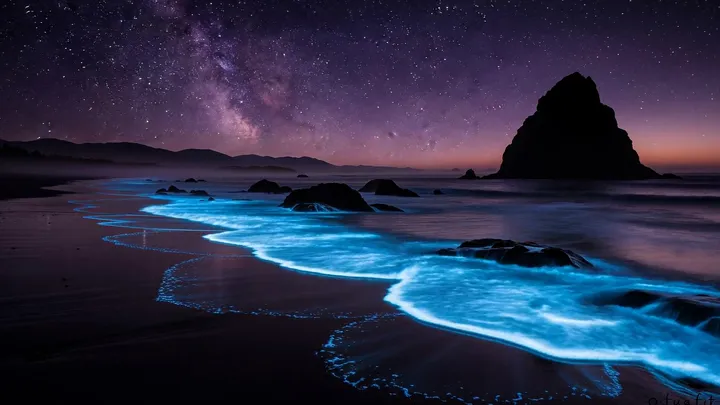
The clip is short, heavily compressed, and loops seamlessly, so it stays light on your connection and your battery. And because animated backgrounds are opt-in, your homepage only moves when you want it to.
The hard parts of the video ones (there were a few)
Looping video sounds simple. Making it look effortless was anything but.
Getting the loop seamless
The last frame has to flow back into the first frame with no visible seam. A single drifting cloud that doesn't return to where it started, and the whole illusion snaps. Most clips needed several attempts before the motion came back around cleanly.
Avoiding the "frozen" look
When I pushed the AI too hard toward a perfect loop, it would overcorrect and barely move at all. A video that looks like a photo defeats the entire point. Finding the line between "loops cleanly" and "actually feels alive" took a lot of trial and error.
Beauty vs. file size
A gorgeous 4K clip can be tens of megabytes, far too heavy to load behind a homepage that's supposed to feel instant. So every keeper gets compressed hard, and the challenge is shaving the file down to a fraction of its size without the quality visibly falling apart.
Being kind to your device
A video playing forever could chew through battery and CPU. So animated backgrounds are strictly opt-in, nothing moves unless you pick one, and playback pauses when the tab isn't in front of you. The default homepage stays as light as ever.
How to make a video background for your homepage
The whole pipeline runs on AI video models, with a deliberately cheap first step so I don't waste money on scenes that won't work.
Start with a great, repeatable image
Every video begins as a single still: sometimes a photo, sometimes an AI image generated for the exact scene I have in mind.
Run a cheap test loop first
Before spending real money, I render an inexpensive draft, under a dollar, just to see whether the scene moves nicely and loops back on itself.
Re-render the keepers at full quality
The scenes that pass the cheap test get to the final phase of re-making it on a higher-end video model This is the expensive step, so I only ever spend it on something I already know works.
Compress until it's light weight and streams well
Finally I encode each clip down to a small, modern video file that streams quickly behind your homepage. I used Claude for this step, in addition to some other local software on my Macbook.
Video cost breakdown
People are always surprised that this kind of thing is now possible for a one-person project. Here's roughly what goes into a single finished animated background:
These costs will change over time. Each model has its own pricing structure. But, as of mid-2026, this is what it cost me.
The other option: Living Backgrounds
No video, no image, no download
That's the whole idea behind living backgrounds. Each scene is a small program that paints a canvas behind your homepage, thirty times a second, forever. I shipped 12 different ones, and will continue to see which are popular for homepage users, then adjust accordingly.
- Constellation — drifting motes that link as they pass
- Aurora — slow curtains of light over a starfield
- Deep Field — a slow fall through distant galaxies
- Orbits — quiet elliptical paths, endlessly crossing
- Contour — topographic lines breathing in and out
- Lagoon — light moving under warm shallow water
- Fireflies — blinking low over a dark meadow
- Just Breathe — enormous soft clouds of colour, breathing
- Embers — sparks rising off something out of frame
- Snowfall — exactly what it says, and very hard to stop watching
- Ripples — rings spreading across still dark water
- Sakura — slow ribbons of pink, like silk on water
Three things are genuinely better about this approach, and one thing is genuinely worse. The better parts:
- PROS: No "hot" laptop or overused CPU/GPU. It never repeats (no looping effect), and it fits any screen.
- CONS: It can't be realistic (like a photo).
The thing I was most nervous about was performance, because "JavaScript animation running forever behind your homepage" is a reasonable thing to be suspicious of. So each scene draws at a capped 30 frames per second — the motion is slow enough that you can't tell it from 60, and it halves the work. On top of that, every scene watches its own frame rate for the first half minute: if your device can't hold 20fps across two consecutive three-second windows, the scene stops. Pretty spiffy.
The results
When one of these comes together, it genuinely stops me in my tracks.
Why I'm hopeful you'll love it
The best ones are pretty cool, and perfectly subtle for a homepage background. I'll be honest: part of why I built this is that I haven't really seen anyone else doing it well. Plenty of homepages let you pick a photo. Very few give you a hand-picked, seamlessly looping, performance-aware living wallpaper that you can turn on with a single click. I plan on making several more of both, and have been monitoring popularity on the backend.
Frequently Asked Questions
What's the difference between a video background and a living background?
A video background is a short, seamlessly looping clip — real footage of a waterfall, a campfire, drifting snow. A living background isn't a file at all: it's code that draws a scene in your browser as you watch, so there's nothing to download and it never repeats, because there's no loop to repeat. Videos win on realism; living scenes win on weight and variety.
Will an animated background slow down my homepage or drain my battery?
Only if you pick one — both kinds are opt-in. Videos are brief, heavily compressed loops that stop playing when you switch away from the tab. Living scenes are the lighter of the two: nothing to download, no video decoding, a hard 30fps cap, and an automatic freeze to a still frame on any device that can't keep up. If you'd rather spend no power at all on motion, a still background is always there.
Can I use these on my phone or iPad?
Not yet — the Animated tab where both kinds live is desktop only. Pushing a looping video down someone's phone data plan is a bad trade, and when I checked, mobile use of that gallery was under one percent. Living backgrounds don't have that download problem, so they're the likelier of the two to come to phones later. On a phone or tablet today you can still pick any still photo, colour, or gradient.
Can I switch back to a still photo?
Any time. Open the Backgrounds dialog and pick a regular photo or one of the AI backgrounds instead. The change is instant and nothing is locked in.
Will you keep adding new animated scenes?
That's the plan, on both sides. Video keepers take real money and a lot of fiddling, so those grow slowly. Living scenes only cost me evenings, so they tend to show up in batches whenever something in the lab turns out well. If there's a scene you'd love to see move, tell me on the Help page.
Go turn one on
The best way to understand the difference is to see it behind your own widgets. Open the Backgrounds dialog on a desktop browser, head to the Animated tab, and you'll find both sets waiting — living scenes on top, video ones below. Pick one and watch your homepage come to life.